Occupations, SQL HackerRank challenge explained
Lately I’ve been trying to improve my SQL skills on HackerRank.
This problem gave me a bit of a fight and I had to recapitulate a lot of old concepts. Therefore, decided to create this detailed solution to the problem.
Note: This SQL solution is valid for MS SQL Server.
Problem statement:
Pivot the Occupation column in OCCUPATIONS so that each Name is sorted alphabetically and displayed underneath its corresponding Occupation. The output column headers should be Doctor, Professor, Singer, and Actor, respectively.
Note: Print NULL when there are no more names corresponding to an occupation.
Input Format
The OCCUPATIONS table is described as follows:
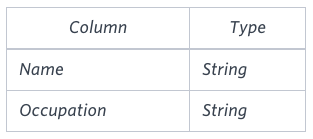
Occupation will only contain one of the following values: Doctor, Professor, Singer or Actor.
Sample Input
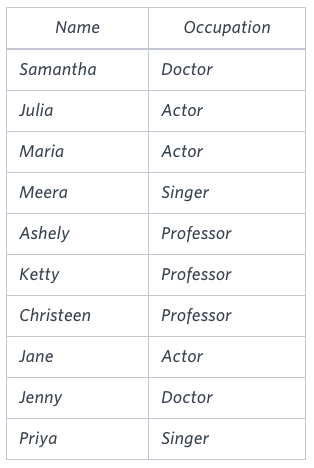
Sample Output
Jenny    Ashley     Meera  Jane
Samantha Christeen  Priya  Julia
NULL     Ketty      NULL   Maria
Explanation
The first column is an alphabetically ordered list of Doctor names. The second column is an alphabetically ordered list of Professor names. The third column is an alphabetically ordered list of Singer names. The fourth column is an alphabetically ordered list of Actor names. The empty cell data for columns with less than the maximum number of names per occupation (in this case, the Professor and Actor columns) are filled with NULL values.
Explained solution:
I decided to start from the pivot table. If you are familiar with Excel pivot tables, then SQL Pivot functionality will sound familiar in concept. You can familiarize with the syntax and learn more about it here.
We start with a simple example:
SELECT *        -- Columns to 'show'
FROM Occupations
PIVOT(
  COUNT(Occupation)   -- Values to pivot
  FOR Occupation
  IN ([Doctor], [Professor], [Singer], [Actor])
  ) -- Values to count when occupation is IN (equal to) one of these
  as OccupationsBool;
The result is a boolean mask (a matrix of zeros and ones) with ones for the profession names and zero otherwise as seen in the following table:
| Name | Doctor | Professor | Singer | Actor |
|---|---|---|---|---|
| Ashley | 0 | 1 | 0 | 0 |
| Christeen | 0 | 1 | 0 | 0 |
| Jane | 0 | 0 | 0 | 1 |
| Jenny | 1 | 0 | 0 | 0 |
| Julia | 0 | 0 | 0 | 1 |
| Ketty | 0 | 1 | 0 | 0 |
| Maria | 0 | 0 | 0 | 1 |
| Meera | 0 | 0 | 1 | 0 |
| Priya | 0 | 0 | 1 | 0 |
| Samantha | 1 | 0 | 0 | 0 |
The next step is to substitute the ones by the Name values.
To simplify, we can set aside this first query and create a new separated one. We will come back to it later.
Our objective now is to create a query which separates our names (professions) in groups but without aggregating them into a COUNT or MAX function. In other words, we want to group our professions in sections of rows. A good way is to use an OVER clause with the ROW_NUMBER function which acts like a window function for the clause values.
Note that we want the names alphabetically ordered and because of that, we add the ORDER BY clause like bellow:
SELECT Name, Occupation,
       ROW_NUMBER() OVER (PARTITION BY Occupation ORDER BY Name ASC) as OccRowNumber
FROM Occupations;
And the query output:
| Name | Occupation | OccRowNumber |
|---|---|---|
| Jane | Actor | 1 |
| Julia | Actor | 2 |
| Maria | Actor | 3 |
| Jenny | Doctor | 1 |
| Samantha | Doctor | 2 |
| Ashley | Professor | 1 |
| Christeen | Professor | 2 |
| Ketty | Professor | 3 |
| Meera | Singer | 1 |
| Priya | Singer | 2 |
Merging the two queries we get:
SELECT *
FROM (
    SELECT Name, Occupation, ROW_NUMBER() OVER (PARTITION BY Occupation ORDER BY Name ASC
    ) as OccRowNumber
FROM Occupations) as occ_part
PIVOT(
  COUNT(Occupation) FOR Occupation IN ([Doctor], [Professor], [Singer], [Actor])
  ) as pvtable;
And the resulting table:
| OccRowNumber | Doctor | Professor | Singer | Actor |
|---|---|---|---|---|
| 1 | 1 | 1 | 1 | 1 |
| 2 | 1 | 1 | 1 | 1 |
| 3 | 0 | 1 | 0 | 1 |
If we look closely, the amount of ones in the occupation columns are the same as the number of times they appear in the previous query. It seems we are close, and the final query is just a few changes ahead.
We need to get rid of the OccRowNumber, and change the ones by the names. Instead of the COUNT in the pivot aggregation, we can use MIN or MAX functions, which in this case, since it would be evaluating only one value (one for each row) it will have the peculiarity of returning the string itself or NULL if there is nothing to evaluate.
The final query is therefore:
SELECT [Doctor], [Professor], [Singer], [Actor]
FROM (
    SELECT Name, Occupation, ROW_NUMBER() OVER (PARTITION BY Occupation ORDER BY Name ASC
    ) as OccRowNumber
FROM Occupations) as occ_part
PIVOT(
  MIN(Name) FOR Occupation IN ([Doctor], [Professor], [Singer], [Actor])
  ) as pvtable;
Which results in the expected output for the challenge.
You can also play with the queries and the sample data in this SQL Fiddle.